This document explains the steps you need to follow to delete all the data associated to your account stored in the “One Win a Day” Ⓡ mobile application (by Artem Kondratyev, a private developer).
“One Win a Day” Ⓡ mobile application does not manage user accounts by itself, but instead allows you to authenticate using your Google account. All the data you provide to the application is stored with a reference to that account, namely:
Overall day result;
Your daily win;
Your life priorities and how your daily win maps to your priorities.
The steps described in this document enable you to delete all the abovementioned data you stored in the application.
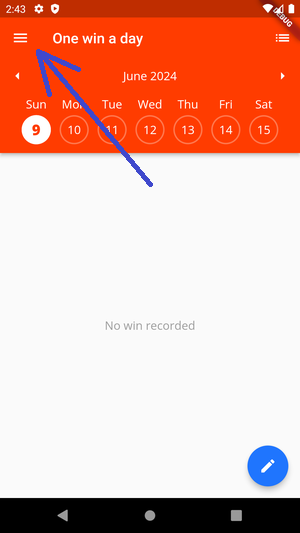
Click on the "hamburger" menu to open the sidebar
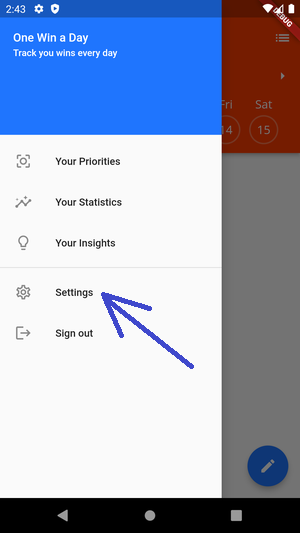
Click on "Settings" to open the app settings
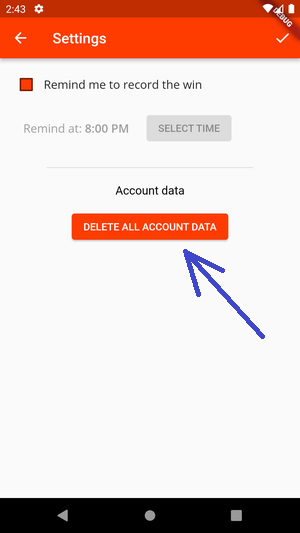
Click on "DELETE ALL ACCOUNT DATA" in the Account data section
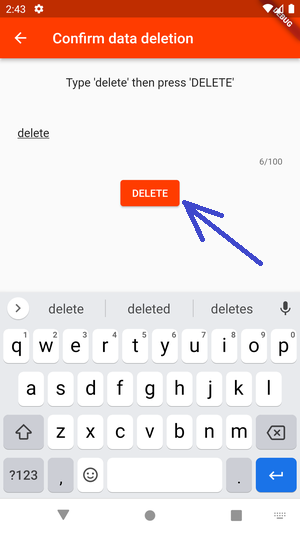
In the following screen, type "delete" in the text field, to enable the "DELETE" button. This extra step is
intended to protect you from accidental deletion of your data
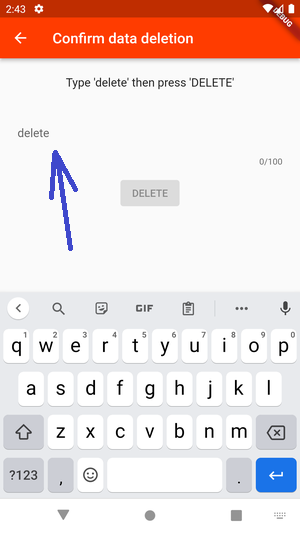
Click on "DELETE" to delete all your data stored in the application
At the end of this process, all your data stored in the “One Win a Day” Ⓡ mobile application will be deleted.